Data Destroyer
Software for secure file deletion and hard drive cleaning
Testimonials

User manual

Data Destroyer is a program which allows you to delete files permanently. To "purge" a file (on a disk or on any writeable magnetic medium such as a memory stick) means to overwrite the data in the file many times (and then delete it) so that the data which was in the file cannot be recovered by any means. (A program which does this is sometimes called a "file shredder", by analogy with a paper shredder.) Several overwrites (at least) are required for security, since just one may leave electronic traces of the original data which can be detected by very sensitive equipment designed to do this.
Data Destroyer is for:

  1. Purging one or more files (optionally of a specified type) in a folder.
  2. Purging all files in selected subfolders.
  3. Purging the free space on a disk.
  4. Purging (a.k.a. cleaning) an entire disk (especially a hard drive), except, optionally, for the files in selected folders.

If you wish to make sure that information which has been written to disk (such as financial data, company plans, proposals, etc.) can never be seen again after you remove it then you need a program with the capabilities of this one. Also, if you sell your old PC you may wish to make sure that all data is erased (permanently and irrecoverably) from the hard disk, including (for PCs running Windows 98) data in the swap file.

Beware of data removal programs that are claimed to delete files quickly. The only way data can be removed permanently is to overwrite it (on disk, not just in the disk cache) several times (not just once), and this takes time (more or less, depending on the speed of the hardware involved).

Data Destroyer can purge multiple files in multiple folders in a single operation. You can tell Data Destroyer not to delete a purged file so that you can inspect the contents with a hex editor (or re-use the file in testing). And you can request an estimate of the time required to purge a set of files, to purge the free space or to purge the entire disk.

 
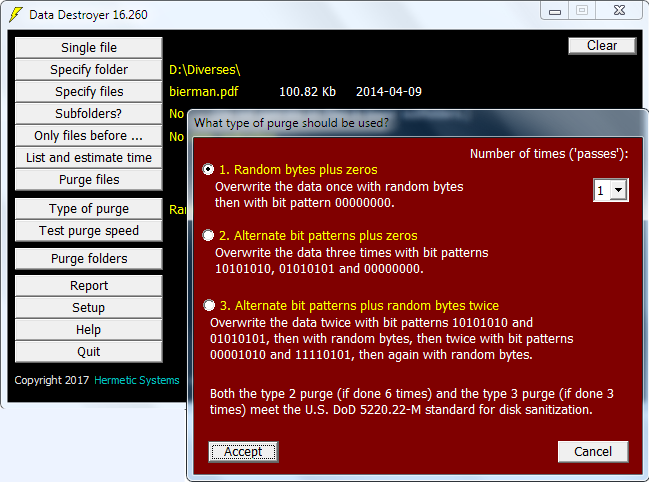
Here is a typical screenshot:

Data Destroyer screenshot

If you just need a program to wipe a hard drive, and don't need to be able to purge individual files or folders, then you may prefer our Data Destroyer Disk Wipe.


User Manual
  1. Introduction
  2. Types of purge
  3. Testing purge speed
  4. Purging a single file
  5. Purging multiple files
  6. Listing files and estimating purge time
  7. Refining and confirming the purge operation
  1. Purging selected folders
  2. Purging the free space
  3. Purging a disk (cleaning a hard drive)
  4. Saving and loading the setup
  5. Further considerations
    1. Purging only the slack area
    2. Compatibility with antivirus software
    3. Protected files
    4. Purging the swap file


Trial version: A copy of the Data Destroyer installation program can be downloaded from this website for the purpose of installing a trial version for evaluation. Click on the following link for further information:

Download Data Destroyer ...


via our PayPal order form
or via our Kagi order form
Price and ordering: A single-user license for Data Destroyer costs$28.95, €19.75 or £17.75 (excluding any sales tax).  Purchase via any of the links at right.  After a user license has been purchased an activation key can be obtained by email to make the software fully-functional. An activation key can be sent immediately if purchasing via PayPal or Share-it. (How?)

See also our offer of a discount with a multiple purchase via PayPal.

Refund: A refund will be provided promptly up to thirty days after purchase if the software does not perform satisfactorily.

Updates: Purchasers of a user license for this software are entitled to an update to any later version at no additional cost.

Upgrading from Data Destroyer Disk Wipe: Purchasers of a user license for Data Destroyer Disk Wipe may upgrade to a license for this software. Further information here.

Hermetic Systems Home Page