Hermetic Word Frequency Counter German version Click on this link for the Advanced Version of this software. This software scans a text file, or text on the clipboard, and counts the number of occurrences of the different words (optionally ignoring common words such as this). The words which are found can be listed alphabetically or by frequency, with rank and frequency displayed for each word.
This software acts on text and text-like files; it does not act directly on MS-Word .doc files, which are binary files (see Scannable Files below).
The Advanced Version of this software does everything that this version does (and in addition has the ability to count words in multiple files and the ability to count phrases as well as words). Thus the user manual for this version should be regarded as Part I of the user manual for the Advanced Version (but note that the appearance of the main window and of the 'Set parameters' window differ in the two versions).
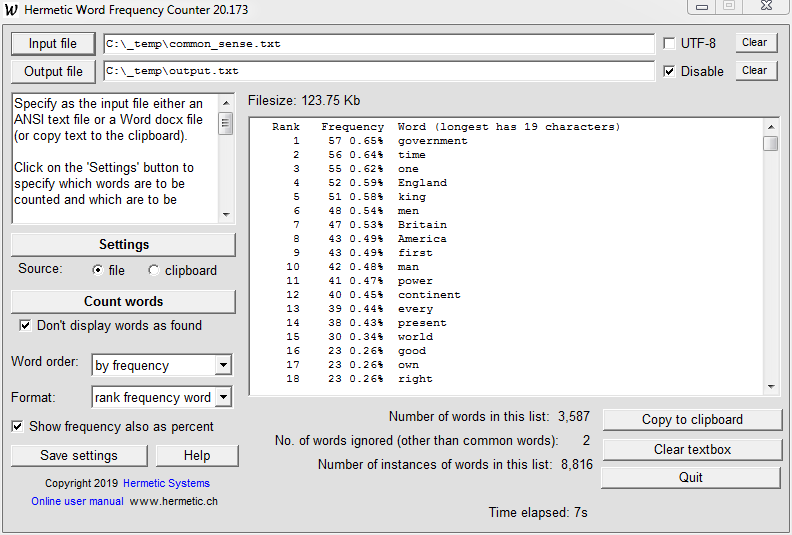
Here is a typical screenshot, showing the results of ascertaining word frequencies in a 248 KB text file, with common words such as 'the' ignored and with the words sorted by frequency:
The program counts the frequencies of all (non-common) words in the file. If you just want to know how many times a single word occurs (or words in a set of words) then you can do this with the Advanced Version of this program.
What is a Word?
The term 'word' usually means a word in a natural language such as English or German, but for this software it has an extended meaning:
- In the standard version a word is any sequence of characters consisting of letters from a European language plus (optionally) hyphens (-), underscores (_), colons (:), periods (.), apostrophes ('), forward and backward slashes (/\), @-signs and numerals.
- In the Advanced Version a word may (optionally) in addition to these also include ampersands (&), commas and opening and closing parentheses, plus up to five user-specified characters (such as currency signs and asterisks).
The following characters are not admissible in words: plus signs (+), semicolons (;), double quotes (") and left and right angle-brackets (<>).
A word may begin or end with any alphabetic character and with any admissible non-alphabetic character (if such a character is allowed in the Set Parameters window) except for a hyphen, an apostrophe, a period or a colon (and, in the Advanced Version, except for a comma or a parenthesis).
Periods and @-signs may (if allowed in the Set Parameters window) occur within a word, thus enabling the counting of email addresses. Allowing colons, forward slashes, hyphens, underscores and periods in a word enables the counting of URLs.
The fact that the Advanced Version allows words with commas and parentheses means that chemical compounds can be treated as words, e.g.: 2,5-dimethoxy-4-(N-propyl-thio)benzaldehyde. (For more details on this possibility see here.)
Scannable Files
The file upon which the program acts can have any filename extension, but it must consist almost entirely of text characters (either 8-bit text or 16-bit Unicode text). More exactly, it must consist only of characters with single-byte values in the range 32 through 255, except for whitespace characters: linefeeds (byte value 10), carriage returns (13), tab characters (9), backspaces (8) and page breaks (12) — except that (i) Unicode text has zero bytes and (ii) up to 0.1% of the bytes (other than zero bytes in Unicode text files) are allowed to be "anomalous bytes", that is, bytes with values less than 32 but which are not whitespace characters. This exception is due to rare cases where a large text file will, for some reason or another, contain a few anomalous bytes (which should thus not prevent the program from treating the file as a text file).This program does not work correctly with UTF-8 text files which have non-English letters. These should be read using WordPad and resaved as Unicode text files.
The input file would typically consist of natural language text (English, German, Spanish, etc.), but need not; it can consist of program code (e.g., a C++ source file) or can be an HTML or an XML document.
Files containing non-displayable characters, such as documents written with MS-Word and Adobe Acrobat, cannot be processed by reading the file directly. For files such as this either (a) save the file as a standard ASCII text file and apply this software to that file or (b) open the document in Word (or whatever is the appropriate application), select all the text and copy it to the clipboard, then Count word frequencies with clipboard selected as the source. (There is a limit on the number of characters in the text on the clipboard — 100,000 — so for large files (a) must be used, if possible.) The text in the clipboard and can be pasted into the textbox before (or after) the words are counted, but need not be. When clipboard is selected as the source the program counts the words in the text on the clipboard, not the words in the text in the textbox.
To repeat (so as to make this clear): The program does not count words in the textbox, only words either in a specified input file or words in text on the clipboard. You may compose text in in the textbox, but to do a word count on this you must first copy it to the clipboard. That's one reason there is a Copy to clipboard button (which is available only after the software has been activated).
Setting the Operation Parameters
The concept of counting words may seem simple, but is not. What is a word? Is double-click one word or two? Is don't a word? Is cat the same word as Cat? Do you want to count all words? Including common words such as this, with and him? This program allows you to customize its operation so that just the words are counted in which you are interested, and, as noted above, words may (if you wish) include hyphens, apostrophes, etc.Here is a screenshot of the page for customizing the operation of the software:
If you wish to treat an email address as a word then check the boxes for at-signs, periods, hyphens and underscores. If you wish to treat a URL as a word then check the boxes for colons, forward slashes, periods, hyphens and numerals. (Note that if a word may contain a forward slash then a double forward slash cannot be used as a start-comment marker. The software checks for conflicts such as this.)
See What is a Word? above for more on which characters can occur in words (and at the start and end of words).
Parameters set using this screen may be saved at any time (using the Save state button on the main screen) so as to be restored on the next run.
You can also save a set of parameters to a parameter file (which must have extension .wfc, or .wfca in the Advanced Version), and reload it later. This allows you to keep several different parameter sets at hand for working with different kinds of files (e.g., text in different languages).
The Reinitialize button sets all parameters back to the way they were when the program was first run.
Ignoring Common (or Specified) Words
You can tell the program to ignore common words, such as 'the', 'and', etc. These words are contained in a file of your choice. When this file has been specified and Ignore common words in file is checked the program will ignore any words in the text which it finds in the specified file. No distinction is made between upper and lower case in words to be ignored. For example, if "and" is to be ignored then "AND" will also be ignored.
If just a few special words are to be ignored then they can be specified in the Ignore these words textbox, as shown above.
Seven files are provided containing common words in English (cwds_en.txt, 353 words), German (cwds_de.txt, 373), French (cwds_fr.txt, 325), Italian (cwds_it.txt, 273), Spanish (cwds_es.txt, 277), Portuguese (cwds_pt.txt, 276) and both English and German (cwds_en_de.txt, 717). These files are in the folder containing the program files (created during program installation), and there is a download link in the Windows Explorer program menu after installation.
You can add or remove words as you wish, and words do not have to be in alphabetical order or on separate lines. Words within a single line must be separated by a space (not a comma or a comma+space). As noted above, upper/lower case is not significant in the list of common words. The file must consist only of text (that is, binary files such as MS Word files cannot be used).
The "common words" file need not actually consist of common words. You can include any words in the file, common or otherwise. For some reason you might wish to ignore a set or words which are not common words.
In the user manual for the Advanced Version the term "common words" is replaced by the term "words-to-ignore". The words-to-ignore file cannot contain phrases, only words.
Rank and Frequency Display
The 'rank' and 'frequency' values may each be included in, or excluded from, the displayed results.
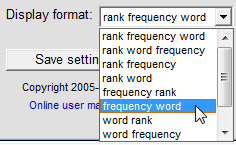
If the output file consists only of words, with no rank or frequency values, then you can get these either as a list (one word per line) or as comma-separated. This is done by making the appropriate selection in the Display format drop-down menu.
Non-English Text
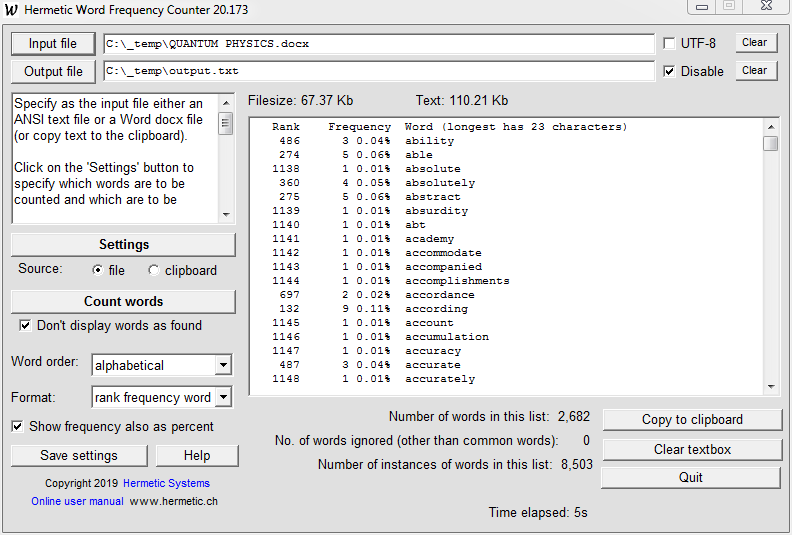
Hermetic Word Frequency Counter may be used with text in languages other than English, including German, French, Italian, Spanish and Portuguese — in fact, any language with characters that can be encoded in WinLatin1 a.k.a. Windows 1252. The program also works with text encoded using Unicode. (As noted above, this program does not work correctly with UTF-8 text files which have non-English letters. These should be read using WordPad and resaved as Unicode text files.)Here are examples of the output when using German text (the words are ordered alphabetically) and French text (words are ordered by frequency):
![]()
![]()
The option for dropping a final 's' unless it is preceded by an 's' or a vowel is intended to allow the conflation of single and plural nouns in English (e.g., 'dog' and 'dogs'). This option also helps to conflate German nouns with their genitives, e.g., 'Bewußtsein' and 'Bewußtseins'. But this option may have unintended consequences, so it is better to leave it unchecked unless results of a scan suggest that it should be used.
HTML, XML, PHP and C/C++ Files
Files of these types (with file extensions htm, html, shtm, shtml, xml, php, c and cpp) are here called code files. The input file need not consist simply of natural language text, but may be such a code file, which may mix natural language with tags such as "<table>".When processing HTML files, HTML tags such as "<center>" are skipped. When processing XML files all text within "<" and ">" is skipped. PHP files are processed as HTML files in which C-style comments are possible (see below). When processing PHP files, text within "<?php" and "?>" is not skipped.
Embedded Comments
An input file (but not text on the clipboard) which is not a code file may contain comments. The beginning of a comment is marked by the start-comment characters specified in the Set parameters screen, and the end of the comment is marked by the end-comment characters. If the end-comment marker is empty (blank) then the comment ends at the end of the line.Comments are skipped when counting words. The use of start-comment and end-comment markers thus makes it possible to exclude sections of the input file from the word-counting process.
It is possible to specify two pairs of start-comment and end-comment markers. This allows both single-line comments and multi-line comments in the same input file. To take an example from C programming, // may be used as the start-comment characters for single-line comments and /* and */ may be used as the start-comment and end-comment markers for multi-line comments, specified as follows:
Then words (or variables, function names, etc., in a C program) within comments such as the following are not counted:
// This is a one-line comment.
/* This is a comment which can be
extended over several lines. */To count words only up to and including a certain line in a text file, specify /* and */ as the start-comment and end-comment markers and insert a line consisting only of /* just after the line you wish to stop at.
When processing code files the comment markers are automatically set so that tags are ignored. This means that /* and */, or other markers, cannot be used as start-comment and end-comment markers in code files. If the start-comment and end-comment markers have been set in the Set parameters screen then the original settings are restored after a code file has been processed.
C-style comment markers (/* ... */) can be used in the files of common words to temporarily disable sections of those files (so that the words within those sections are not treated as common words, but are counted when they occur within the input file).
Input File Size & Output to a File
There is no limit on the size of an input file. The program has been tested with text files up to 1 Mb in size, and with files containing over 11,000 different words. In such cases processing of the text may take some time, and for these cases a progress bar is provided:
There is, however, a limit on the amount of text which can be held in the output textbox, either by pasting from the clipboard or as a result of listing words found. This does not prevent Hermetic Word Frequency Counter from being able to handle large files. For example, there may be a file on your PC named Win32api.txt. This is about 652 Kb in size and has over 80,000 instances of about 11,000 different words. When the program is run on this file, with the Don't display words as found option unchecked, words found as the program goes through the file will be displayed until 2000 words have been displayed, at which point further words are not displayed so as to avoid a buffer overflow. After the entire file has been processed, the words found will be listed until the capacity of the output textbox buffer is reached. If the words are listed in alphabetical order then (in the case of Win32api.txt) only words beginning with a, b, c or d are listed.
In order to obtain a complete listing of the words in this file you have to specify an output file before starting the word count. In this case the complete listing is written to the output file before the listing is given in the output textbox. The displayed listing will still stop with words beginning with d, but the entire listing can be viewed by opening the output file in some text editor such as WordPad.
Hermetic Word Frequency Counter has been used successfully with large files with many different words. In one case a 4.12 Mb file with 46,398 different words, and in another a 12.1 MB file with 61,979 different words (and a total of 1,847,893 instances of these words).
Transfer of Results to an Excel Spreadsheet
The output can easily be transferred to an Excel spreadsheet as follows: If the output has not already been written to an output file then copy the output to the clipboard, paste it into some text editor such as Notepad, and save it as a .txt file. Load this into Excel, which will automatically detect the columns.If you specify an output file then the results will be written to that file. In the Set parameters panel you can specify that the output should be written as comma-delimited, so that the file can be read by some statistical programs that (unlike Excel) cannot detect fixed-width fields.
Click on this link for the Advanced Version of this software.
If your interest in word-counting software is more for producing keywords meta tags for HTML documents then see Keywords Meta Tag Generator and the Advanced Version.If you are more interested in searching a file for a particular word or phrase then see Index Files Search Words or the Lite version.
Video requirements: The minimum screen resolution required is 800x600, but 1024x768 is recommended.
Demo version: A copy of the Hermetic Word Frequency Counter installation program can be downloaded for the purpose of evaluation. Click on the following link for further information:
Download Hermetic Word Frequency Counter ...
Price and ordering: A single-user license for Hermetic Word Frequency Counter costs $29.75, €19.75 or £18.25 (excluding any sales tax). Purchase via any of the links at right. After a user license has been purchased an activation key can be obtained by email to make the software fully-functional. An activation key can be sent immediately if purchasing via PayPal or Share-it. (How?)
via our PayPal order form.or via our Kagi order form. or via our Share-it! order form. See also our offer of a discount with a multiple purchase via PayPal.
Refund: A refund will be provided promptly up to 30 days after purchase if the software does not perform satisfactorily.
Updates: Purchasers of a user license for this software are entitled to an update to any later version at no additional cost.
Upgrading to the Advanced Version: Purchasers of a user license for this software may upgrade to a license for Hermetic Word Frequency Counter Advanced Version by paying $21.45, €14.25 or £12.95 (excluding any sales tax). To purchase the upgrade click on one of the links below. Note that this is available only if a single-user license for Hermetic Word Frequency Counter has already been purchased.
Frequently Asked Questions Hermetic Systems Home Page