Hermetic Word Frequency Counter
Advanced Version
Hermetic Systems
There are two versions of this software: basic and advanced.
Click on this link for the basic version.

via our Paymate
order form
via our Kagi order form
via our Share-it order form
or via PayPal
This software scans a text file, multiple text files, or text on the clipboard, and counts the number of occurrences of the different words (optionally ignoring common words such as this). It also counts the occurrences of any number of specified words or phrases. The words/phrases which are found can be listed alphabetically or by frequency, with rank and frequency displayed for each one.

The Advanced Version does everything that the basic version does, so this page explains only the functions of the Advanced Version which are not present in the basic version (mainly, the ability to count words in multiple files and the ability to count phrases as well as words). Thus the user manual for the basic version should be read before (or after) reading this page (but note that the appearance of the main window and of the 'Set parameters' window differ somewhat in the two versions).

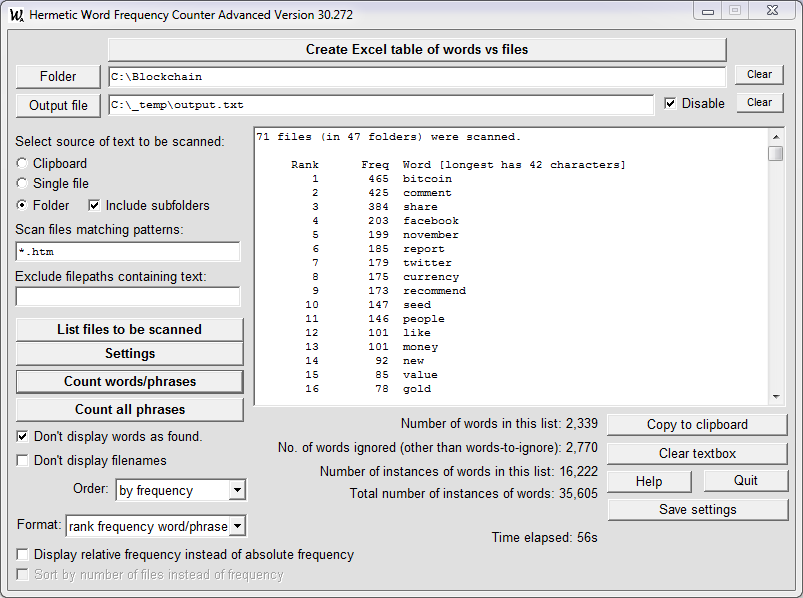
Here is a sample screenshot.


Differences from the Basic Version

There are ten features of the Advanced Version which are not present in the basic version:

Note that the software will count all occurrences of words in one or more files, but phrases to be counted must be specified. Specification of phrases is explained below.

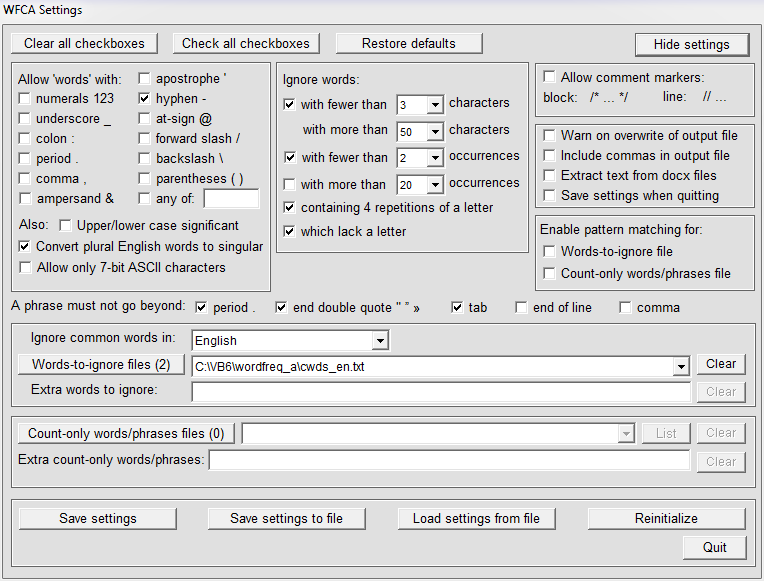
Both the main screen and the parameters screen differ somewhat from those in the basic version, although all the functions of the basic version are retained. Here is what the parameters screen looks like in the Advanced Version:

See Setting the Operation Parameters (in the user manual for the basic version) for further information.


Two Modes of Operation: Count-All and Count-Only

The basic version has only one mode of operation: count-all. The Advanced Version has two different modes of operation: count-all and count-only.

The words (and phrases) found can be listed alphabetically or by frequency, with the rank and frequency of each displayed. In count-only mode the names of the files in which the words and phrases are found can be displayed, together with their frequencies of occurrence in each file.

Note that in count-only mode:

  1. The settings in the 'Ignore words' section of the 'Set parameters' window are disabled and have no effect except for the 'Ignore words with fewer than n occurrences' parameter.
  2. The presence or absence of a words-to-ignore file (or a list of extra words to ignore) makes no difference, since all such words will be ignored anyway, unless they are included among the words to be counted.


Multiple Input Files

Unlike the basic version, which acts only on one file at a time , the Advanced Version can act on multiple files in multiple folders. Here is a typical screenshot:

Hermetic Word Frequency Counter Advanced Version screenshot

Files to be scanned can have any filename extension (the part of the filename following the last period), but the files must consist almost entirely of text characters (either 8-bit text or 16-bit Unicode text). For more detail see the paragraph Scannable files in the user manual for the basic version.

The software allows you to restrict the files which will be scanned to (a) those having a file extension in a specified list and (b) to files not having a specified extension. This is necessary because there may be, e.g., .js and .css text files mixed up with HTML files and you may wish to exclude them in a scan. (If you restrict the file extensions to one or more then there is no need to specify any to be excluded.)

The List files to be scanned operation should be run before doing a scan so that you know exactly what files will be processed.

Various types of files are automatically excluded from a scan, in particular, any binary file. This includes Microsoft Word .doc files, whose file formats are not made public by Microsoft. Other files which are automatically excluded are files with the extensions .xls, .pdf and .sys, plus the common graphics and executable files.


Counting Phrases

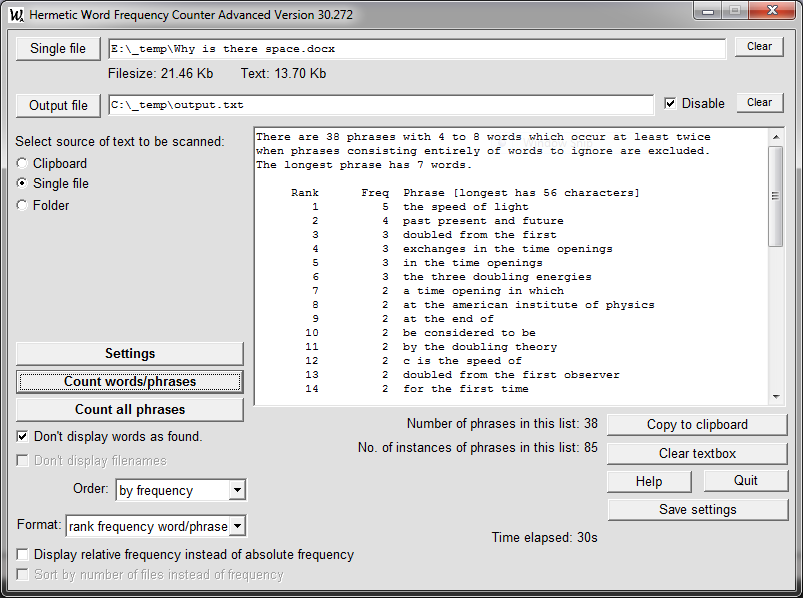
A phrase is a sequence of one or more words (separated by spaces). If all phrases were counted then (in any moderately-sized section of text) there would be a huge number of them, most of which would be of little interest. Thus to count phrases (as distinct from words) you must specify which phrases are to be counted.

If you are interested in just a few words or phrases, they can be added to the 'Extra count-only words/phrases' textbox. If there is more than one word/phrase to be counted then they must be separated by a comma+space (", "), not just a comma — see the example below). A word or phrase to be counted may include a comma, but may not include a comma+space.

If there are many words/phrases to be counted (termed count-only words/phrases) then they should be placed in a text file, and that file specifed by means of the button labelled 'Count-only words/phrases files'. (Phrases in that file are best kept one per line, but more than one is possible if they are separated by a comma+space.) It is possible to switch between multiple files containing words/phrases to be counted, as explained in the next section.

If there are count-only words specified then any specification of words to be ignored will be inoperatve. Thus words-to-ignore are not ignored if they occur in count-only phrases. For example, if "is" is to be ignored then it will not be ignored in a phrase to be counted such as "service is available".

Upper/lower case in count-only words/phrases is not distinguished. Upper and lower case in the results is or is not distinguished depending on the setting of 'Upper/lower case significant' in the Parameters panel. For example, if a text file contains "Jack Smith" three times and "Jack smith" once, and the phrase "Jack Smith" is to be counted, then the result will be as follows: If upper/lower case is not significant then "4 jack smith". If significant then "3 Jack Smith, 1 Jack smith".

If words and phrases to be counted are placed in a count-only words/phrases file then two conventions should be observed:

There is no limit on the number of words in a phrase, but long phrases significantly increase processing time.


Multiple Words-to-Ignore and Count-Only-Words/Phrases Files

In previous versions of this software only only one file containing words-to-ignore could be specified at one time, and similarly only one file containing words/phrases to be counted. The software has been enhanced to allow specification of multiple files of both sorts, with the possibility of switching among alternative files.

For example, suppose you have text files in English and in German. When counting words in the English documents you probably wish to ignore common words in English, and when counting words in German documents you probably wish to ignore common words in German. (Files with common words in various languages are supplied with the software, as explained here.) You could load the two common words files as needed, but there is an easier way to switch between them.

Click on the button labelled 'Words-to-ignore files' and load the file for common words in English. Then do the same for common words in German. Both files are now contained in a drop-down list, as in:

When a file is selected from this list you can either load the words-to-ignore in that file, or you can remove that file from the list (or do nothing).

The 'Clear' button removes all files from the list (after confirmation).

Note that loading a words-to-ignore file, or selecting a file from the list, replaces any previously loaded or selected words-to-ignore. The words in the loaded/selected file are not merged with existing words-to-ignore; rather they replace them.

If you wish to ignore words in two different words-to-ignore files then you must first combine them into one file. An example of this is the file cwds_en_de.txt, which combines common words in cwds_en.txt (Engish) with common words in cwds_de.txt (German). This file could be used when working with documents that are partly in English and partly in German, or when working with documents in English and documents in German without having to switch between the common words file when a document language changes.

If you wish to switch between multiple count-only-words/phrases files then the corresponding button and drop-down list work in the same way.


Extra Possibilities for Displaying Results

In the Advanced Version words and phrases found may be displayed in reverse alphabetical order as well as alphabetical and by frequency.

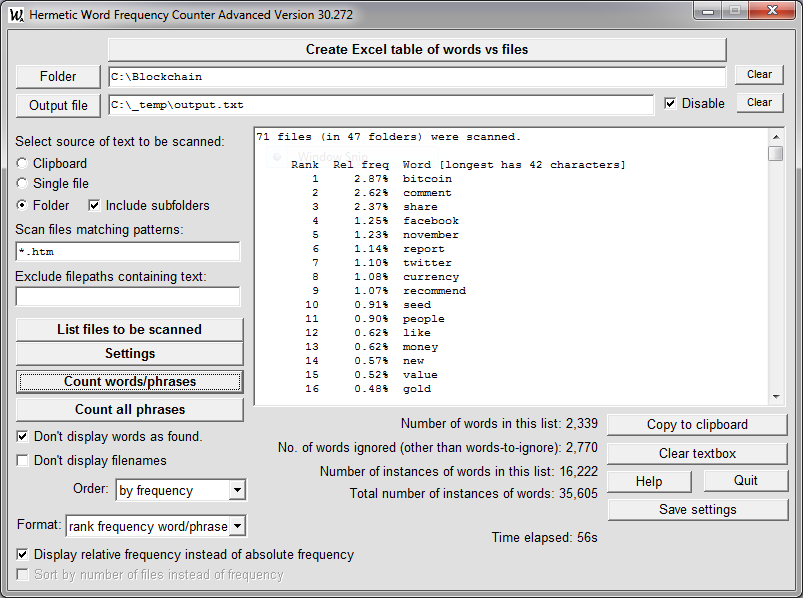
The Advanced Version has four possibilities for displaying the results of a scan which are not available in the basic version. One of these is Zipf data, which produces logarithms of the rank and frequency values. This is not normally needed, but for some possibilities see Use of Hermetic Word Frequency Counter Advanced to Illustrate Zipf's Law.

The other three display possibilities (in the list at right, below 'Zipf data') occur only in count-only mode, that is, when a list of words has been specified in the 'Set Parameters' window (either by reference to a file or by means of a short list) and the software is to count only these words, ignoring all other words. Two examples of this will now be given.


First Example

Suppose we have all the HTML files making up the section on this website on Spin Models in a folder \spin_models. In the software we set the folder to this, then we can count the number of occurrences of certain phrases in these HTML files. These phrases can be placed in a count-only words/phrases file, or, if there are just a few, we can specify them in the 'Set parameters' window as follows (for example):

Phrases must be separated by a comma plus a space (not just a comma).

If we check the boxes in the 'Set parameters' window to allow hyphens and numerals, set the word order to alphabetical, select 'rank frequency word' for the display order, then click on the 'Count word/phrase frequencies' button, the results will be returned in about 10 seconds, as follows:

If we now select 'word freq no.files' for the display order we get:

Selecting 'word file-list' gives us the result at left and selecting 'word file-list (+freq)' gives the result at right:


Second Example

As our second example, suppose we have a number of HTML files which contain the names of many chemical compounds (e.g., the 57 files composing the online edition of the book TIHKAL) and that there are seven compounds we are interested in, namely:

N,N-dioctyltryptamine
diisopropylethylamine
1-acetylindole-3-acetone
3,4,5-trimethoxybenzaldehyde
5-methoxy-3-(2-nitropropenyl)indole
3-methoxy-4,5-methylenedioxybenzaldehyde
4-acetoxyindol-3-yl-N,N-dibutylglyoxylamide

Assuming that we have all 57 HTML files on our local PC we select 'Folder' and select the folder containing these files. Then assuming that the names of the compounds are in a text file as above we specify (in the 'Set parameters' window) this file as the count-only words file. When the software loads this file it will automatically add the characters occurring in the names to the set of allowable characters as shown at right. ('Upper/lower case' etc. are not changed by this.)

Note that if the option for ignoring words which occur less than a certain number of times is checked then there is no need to uncheck it since, as noted above, the 'Ignore words' settings have no effect when there are count-only words, as there are in this example. After looking over the other parameter settings we can now run the software with word order set to 'by frequency' and display option set to 'word freq no. files' to obtain this result:

If we wish to know in which files these names occur then changing the display option to 'word file-list' (and the word order to 'alphabetical') gives us immediately (without having to re-scan the files) the following:

If we want to know exactly how often diisopropylethylamine occurs in each of the three files then we can select the display format 'word file-list (+freq)' to obtain:

Although there is no limit on the number of files which can be scanned, the number of files which can appear in a list of files in which a particular word occurs is limited to 10,000, and the program stops counting the number of occurrences of a word in a file when it reaches 99,999 (limits which are anyway unlikely to be reached).


Third Example

This software can be used to do things besides simply counting words. For example, suppose you have several text files containing words sorted alphabetically, but with many words in common, and you want a single file containing all those words, sorted alphabetically, with each word occurring once only. This software will scan all those files and (with the display format set to 'word') write out a file containing all the words in alphabetical order with each word occurring just once.

As another example, suppose you have a set of text files (such as HTML files) which are the chapters of a book. In the same way as stated in the previous paragraph (with the display format set to 'word') you can get an output file containing all words occurring in the book (optionally, with common words ignored). Immediately rename this file so that the software does not overwrite it (and delete the first line). Specify this file as the count-only words file and run the software on the chapters of the book, with display format set to 'word file-list (+freq)'. You will then get a report such as:

abandon
    1 C:\book\chap17.html
    1 C:\book\chap13.html
    2 C:\book\chap19.html
    1 C:\book\chap32.html

abandoned
    1 C:\book\chap02.html
    1 C:\book\chap17.html
    1 C:\book\chap10.html
    2 C:\book\chap22.html
    1 C:\book\chap32.html
    1 C:\book\chap01.html
    1 C:\book\chap33.html
     
abandoning
    1 C:\book\intro.html

abandonment
    2 C:\book\chap11.html
    2 C:\book\chap33.html

abbot
    8 C:\book\chap35.html
    1 C:\book\chap30.html
    3 C:\book\chap32.html

abeyance
    ...

which tells you, for each word, which chapters it occurs in and how many times in each chapter.


If your interest in word-counting software is more for producing keywords meta tags for HTML documents then see Keywords Meta Tag Generator and the Advanced Version.

If you are more interested in searching a file for a particular word or phrase then see Index Files Search Words or the Lite version.


Demo version: A copy of the Hermetic Word Frequency Counter Advanced Version installation program can be downloaded for the purpose of evaluation. Click on the following link for further information:

Download Hermetic Word Frequency Counter Advanced ...


via our Paymate
order form
via our Kagi order form
via our Share-it order form
or via PayPal
Price and ordering: A single-user license for Hermetic Word Frequency Counter Advanced costs US$48.95, €39.25 or £33.75 (excluding any sales tax). Purchase via any of the links at right.  After a user license has been purchased an activation key will be sent by email to make the software fully-functional. An activation key can be sent immediately if purchasing via Share-it.  (How?)

Refund: A refund will be provided promptly up to 30 days after purchase if the software does not perform satisfactorily.

Updates: Purchasers of a user license for this software are entitled to an update to any later version at no additional cost.

Upgrading from the basic version: Purchasers of a user license for Hermetic Word Frequency Counter may upgrade to a license for the Advanced Version by paying approxmately the difference in price between the two versions plus 10%; see Upgrading to the Advanced Version. Note that this is available only if a single-user license for Hermetic Word Frequency Counter has already been purchased.

Hermetic Systems Home Page