| Hermetic Word Frequency Counter Advanced Version |
| Multiple Input Files |
Unlike the basic version, which acts only on one file at a time, the Advanced Version can act on multiple files in multiple folders.
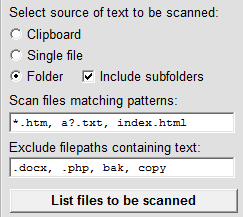 When scanning files in a folder and (optionally) its subfolders, the software allows you to restrict the files which will be scanned in either of two ways. (i) You can provide file name patterns, such as *.txt or *.htm, a?.txt, index.html, where '*' means any (possibly empty) character string and '?' means any character, to restrict the scan to files with names matching those patterns. (ii) You can provide text (character strings without spaces, such as .docx, .php, bak, copy) such that any file whose file path (not just file name) contains that text will be skipped. The latter has two uses: (a) to skip files having certain file extensions and (b) to skip certain subfolders.
The List files to be scanned operation should be run before doing a scan so that you know exactly what files will be processed. Clicking on the output textbox during a listing allows you to pause and resume. This also works during a count-words operation if words are being displayed as found.
Various types of files are automatically excluded from a scan, in particular, any binary file. This includes Microsoft Word .doc files, whose file formats exist in different forms and are not made public by Microsoft. Other files which are automatically excluded are files with the extensions .xls, .pdf and .sys, plus the usual graphics and executable files. There are four types of text files which are also automatically skipped, namely, those with file extensions .js, .css, .ini and .loaded_0 (the last being a javascript file courtesy of Google Inc.). Also .gdoc files are automatically excluded.
| Introduction | User Manual: Contents |
| Hermetic Systems Home Page | |